Troubleshooting
Having an issue? Find your problem below and follow the steps to fix it.
My Agent Isn’t Answering Calls
Check these things in order:
-
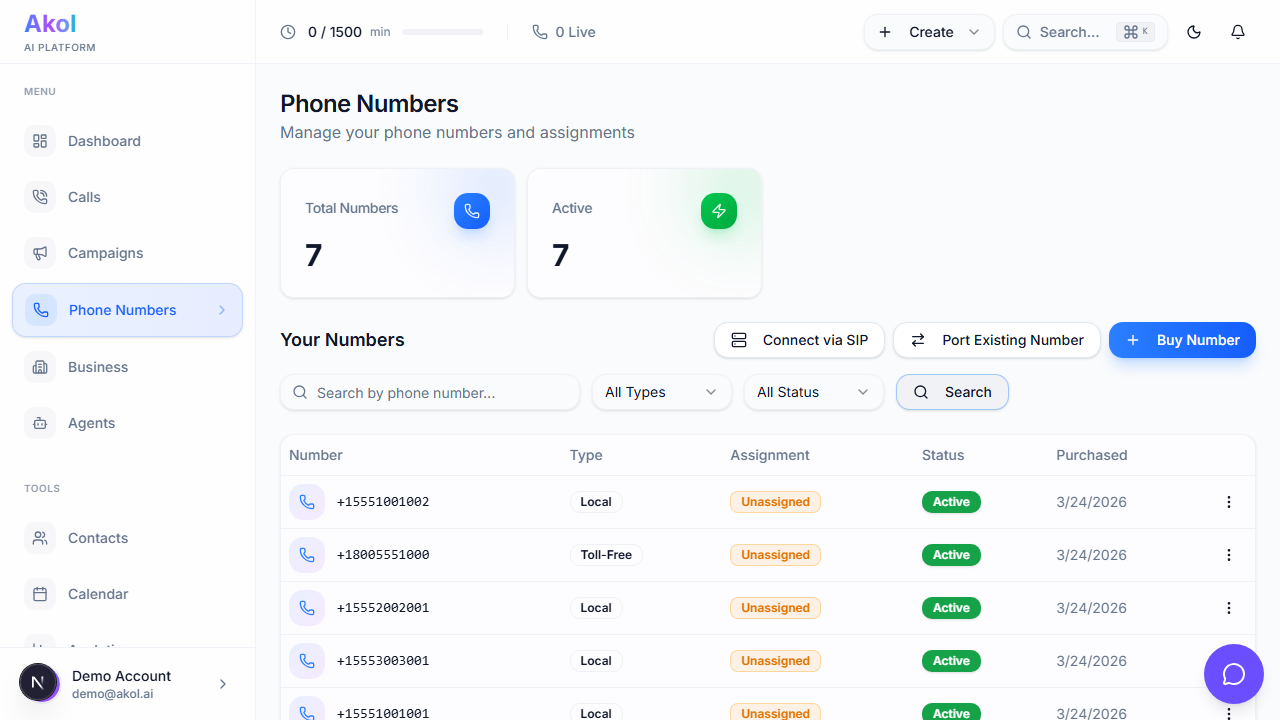
Is your phone number assigned to an agent? Go to Dashboard > Phone Numbers and make sure your number has an agent assigned. Numbers without agents won’t answer calls.
-
Is the number active? Check that the number’s status is Active, not Inactive/Paused.
-
Is call forwarding set up correctly? If you’re forwarding from your existing number, double-check the forwarding number. Try calling the Akol number directly to see if that works.
-
Is your agent set to Active? Go to Dashboard > Agents and check your agent’s status. If it says Draft, switch it to Active.
The easiest test: call your Akol number directly from your cell phone. If the agent answers, the issue is with call forwarding, not Akol.
Calls Aren’t Being Recorded
- Check recording settings — Go to your agent’s settings and make sure recording is enabled
- Check your plan — Recording retention varies by plan (Free: 7 days, Starter: 30 days, Pro: 90 days, Business: 365 days)
- Old recordings may have expired — Recordings are automatically deleted after your plan’s retention period
My Agent Gives Wrong Information
Your agent answers based on the information you’ve given it. If it’s saying something incorrect:
- Go to your Business Profile — Update any outdated information
- Check your agent’s instructions — Make sure they’re accurate and current
- Review the transcript — See exactly what the caller asked and what your agent said
- Update and test — After making changes, do a test call to verify
Common causes:
- Outdated pricing in your business profile
- Missing services that callers ask about
- Incorrect business hours
My Agent Isn’t Booking Appointments
-
Is your calendar connected? Go to Dashboard > Integrations and check that your calendar (Google Calendar, Outlook, or Calendly) is connected and showing a green status.
-
Does your calendar have availability? Your agent can only book open time slots. If your calendar is full, there’s nothing to offer callers.
-
Check your agent’s instructions Make sure your instructions tell the agent to book appointments. For example: “When a customer wants to schedule a service, check the calendar and book an appointment.”
Call Quality Issues
If callers report that the agent sounds strange or cuts out:
- This is rare — Akol’s voice technology is designed for clear, natural conversations
- Check the caller’s connection — Poor cell phone reception on the caller’s end can cause issues
- Listen to the recording — Compare what you hear to what the caller reported
- Adjust voice speed — If the agent talks too fast or slow, adjust the speed slider in agent settings
Agent Responds Slowly
If there are long pauses (more than 3 seconds) before the agent speaks:
- Simplify your agent’s instructions — Shorter, clearer instructions get faster responses
- This can happen on very long calls — The system manages it automatically
- If it keeps happening, contact support
Calls Dropping Unexpectedly
If calls end without a goodbye:
- Check the call details in Dashboard > Calls to see why it disconnected
- Calls have a maximum duration — Very long calls may end automatically
- Review the transcript to understand what happened right before the drop
I’m Not Getting Notifications
- Check notification settings — Go to Dashboard > Settings and make sure notifications are turned on
- Check your email spam folder — Notification emails might be landing in spam
- Verify your email address — Make sure the email on your account is correct
- Check integration connections — If using Slack notifications, make sure the Slack integration is still connected
I Can’t Log In
- Check your email and password — Make sure you’re using the right credentials
- Reset your password — Click “Forgot password” on the login page
- Check your email — The password reset link will be sent to your account email
- Clear your browser — Try clearing cookies and cache, then log in again
Integration Not Connecting
If you can’t connect an integration (calendar, CRM, Slack, etc.):
- Allow popups — Your browser may be blocking the authorization window
- Try a private/incognito window — Browser extensions can sometimes interfere
- Click Allow or Authorize when prompted — Don’t close the window too early
- Disconnect and reconnect — If it was working before, try disconnecting and setting it up again
Dashboard Not Loading
- Refresh the page — Press Ctrl+Shift+R (Windows) or Cmd+Shift+R (Mac)
- Clear your browser cache — Cached data can cause loading issues
- Try a different browser — Or open an incognito/private window
My Subscription Isn’t Working
- Check your payment method — Go to Dashboard > Billing and make sure your card is valid
- Check for failed payments — A declined card can pause your subscription
- Update your card — If your card expired or was replaced, update it in billing settings
Quick Reference
| Issue | First Thing to Try |
|---|---|
| Agent not answering | Check phone number has an agent assigned |
| Wrong information | Update your business profile |
| Can’t book appointments | Check calendar integration is connected |
| Can’t log in | Reset your password |
| Integration broken | Disconnect and reconnect |
| Slow responses | Simplify agent instructions |
| Not getting notifications | Check spam folder and notification settings |
| Payment issues | Update payment method in Dashboard > Billing |
I Need More Help
If you can’t find the answer here:
- Email us at support@akol.ai
- Use the chat widget in your dashboard (bottom right corner)
- Check the FAQ for common questions — FAQ →
When contacting support, include details like your account email, the phone number involved, and the approximate time of the issue. This helps us resolve things faster.